
Position: Set up one AxIT Timing Gate on the timing line. Place a marker 10m before the gate as the start of the run-up, and a turning line 5m beyond the gate. The athlete accelerates through the run-up, crosses the gate, sprints 5m to the turning line, plants and turns 180 degrees, then sprints 5m back through the gate.
Cue: "Accelerate through the run-up so you're at full speed as you cross the gate. Drive to the turning line, plant your foot on the line, turn 180 degrees as sharply as you can, and sprint back through the gate. Don't slow down until you're past the gate."
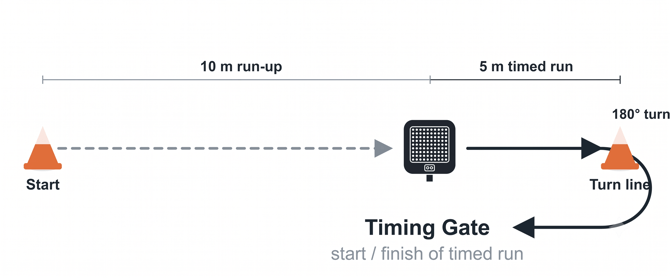
Procedure:
Step 1 – Place one Timing Gate on the timing line. Mark the start of the run-up 10m before the gate and the turning line 5m beyond the gate.
Step 2 – In the AxIT Timing Gate app, create or select the athlete/team and choose Agility as Drill Type. Select the 505 protocol, or set up a Custom agility protocol if it is not listed.
Step 3 – Choose trigger type then click next:
-
Standard – timing starts when the athlete crosses the gate. Use Standard for the 505, as the athlete crosses the gate at speed after the run-up.
Step 4 – Ensure the gate is powered on, then scan and connect it in the app following the prompts. Use the Flash function if needed to identify the gate.
Step 5 – Tap Start Trial in the app. Position the athlete at the start of the run-up.
Step 6 – On the athlete's run, the system automatically starts when they cross the gate and stops when they cross back through it after the turn. The recorded time captures the 5m in, the turn, and the 5m out.
Step 7 – After the run:
-
Tap Save Trial to store the result.
-
Tap Redo if you want to retest without saving.
Step 8 – Review results in the app. Use the Leaderboard icon to compare trials, compare left and right turn directions, or switch between athletes.
Note: Testing both turn directions
Run the 505 turning off each leg (one trial set with a left-foot plant, one with a right-foot plant) and record them separately. The plant leg is the limb that absorbs the deceleration and drives the athlete back out of the turn, so each direction loads a different leg. Comparing the two directions gives a side-to-side picture that straight-line sprinting cannot reveal.
Why it matters in rehab and return to sport:
Asymmetry detection: A meaningful difference between directions can flag a residual deficit in the weaker limb, often the injured or operated side, even when straight-line speed looks normal.
Return-to-sport decisions: Many clinicians compare the injured limb to the uninjured using a Limb Symmetry Index (LSI), with a commonly cited benchmark of around 90 percent before clearing an athlete for change-of-direction demands. Apply your own protocol and thresholds.
Progress tracking: Re-testing both directions across the rehab timeline shows whether the gap between limbs is closing and whether the athlete is reacceleration-ready, not just able to run in a straight line.
Compensation and avoidance: A large or persistent gap can indicate the athlete is offloading or avoiding the injured limb during the deceleration and turn, which is useful to catch before progressing load.