
Position: Set up four cones in a rectangle matching the free-throw lane, approximately 16 ft wide by 19 ft long (about 4.9m by 5.8m). If you have a marked basketball lane, use its four corners. Position one AxIT Timing Gate at the start corner on the start/finish line. The athlete starts at that corner facing up the court, toward the far end.
Cue: "Start at the gate facing up the court. Sprint forward up the side to the far cone, shuffle across the top, backpedal down the far side, then shuffle across the bottom back to the start. Without stopping, reverse the circuit the other way: shuffle across, sprint up, shuffle across, then backpedal back through the gate to finish. Face the same direction the whole time and stay low through every change of direction."
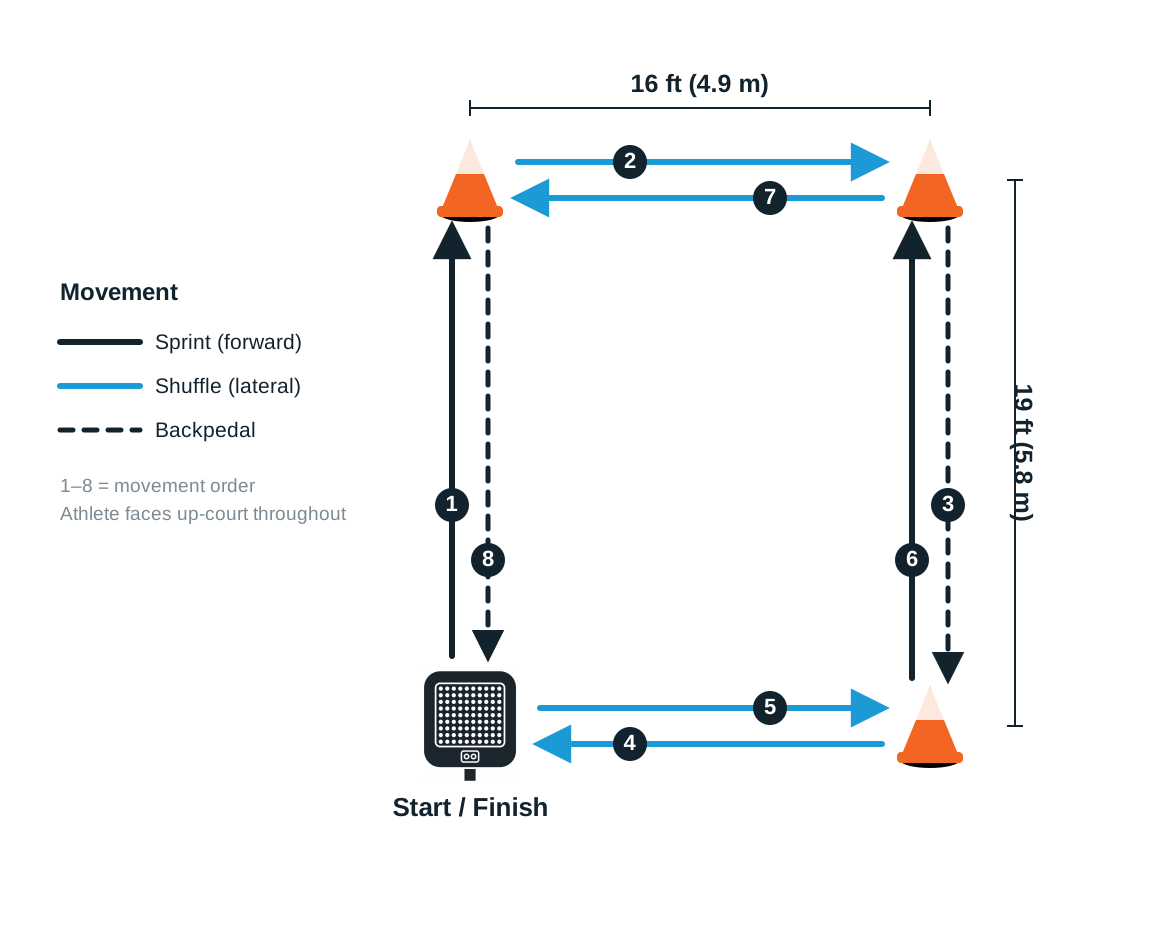
Procedure:
Step 1 – Set up four cones in a rectangle the size of the free-throw lane, approximately 16 ft by 19 ft (about 4.9m by 5.8m). Position one Timing Gate at the start corner on the start/finish line.
Step 2 – In the AxIT Timing Gate app, create or select the athlete/team and choose Agility as Drill Type. Set up a Custom agility protocol for the Lane Agility drill, as it is not a preset.
Step 3 – Choose trigger type then click next:
Standard – timing starts when the athlete crosses the gate.
In-Beam – timing starts when the athlete is already in position at the start corner. Gate will display red light when activated.
Step 4 – Ensure the gate is powered on, then scan and connect it in the app following the prompts. Use the Flash function if needed to identify the gate.
Step 5 – Tap Start Trial in the app. Position the athlete at the start corner, facing up the court.
Step 6 – On the athlete's run, they complete the full circuit in one direction, then immediately reverse it the other way, finishing back through the gate. The system stops when the athlete crosses the gate at the finish.
Step 7 – After the run:
Tap Save Trial to store the result.
Tap Redo if you want to retest without saving.
Step 8 – Review results in the app. Use the Leaderboard icon to compare trials or switch between athletes.
Set-up tip: Because the athlete returns to the start corner midway through the drill (between the two laps), position and orient the gate so it only captures the true start and finish. Align the gate across the sprint and backpedal path, and have the athlete pivot at the start cone during the midpoint transition without stepping back through the beam. If your setup cannot cleanly ignore that midpoint pass, run and time the two laps separately and sum them.